▼ In This Article
Cloud vs On-Premises Venue Booking Software: Which Deployment Model Is Right for Your Venue?
Somewhere between the spreadsheet that only one staff member fully understands and the IT ticket that’s been sitting open for three weeks, most venue teams start asking the same question: should we move our booking system to the cloud, or does it make more sense to keep things running on our own servers?
It’s a fair question, and it’s more complicated than most vendor blogs make it sound. Cloud venue booking software has become the default choice for a reason, but on-premises deployment still makes sense for a smaller set of venues with specific requirements. The right answer depends on your IT capacity, your data governance needs, your integrations, and how your team actually works day to day.
This guide breaks down what cloud and on-premises venue booking software actually mean, where each one fits, what it really costs once you account for everything beyond the license fee, and how to migrate without losing a single booking along the way.
Quick Answer: Cloud, On-Premises, or Hybrid?
Choose cloud if: your team needs remote or multi-location access, you want the vendor to handle updates and infrastructure, and you don’t have a dedicated IT team managing servers.
Choose on-premises if: you have strict internal data-hosting requirements, mature in-house IT resources, deep legacy system customizations, or unreliable internet access at your venue.
Choose hybrid if: you want the accessibility of cloud booking tools while keeping specific legacy systems or integrations running locally during a gradual transition.
For most modern venues, theatres, houses of worship, event spaces, and park districts, cloud has become the practical default. On-premises remains a legitimate choice for a narrower set of situations, which we’ll walk through below.
What Is Cloud Venue Booking Software?
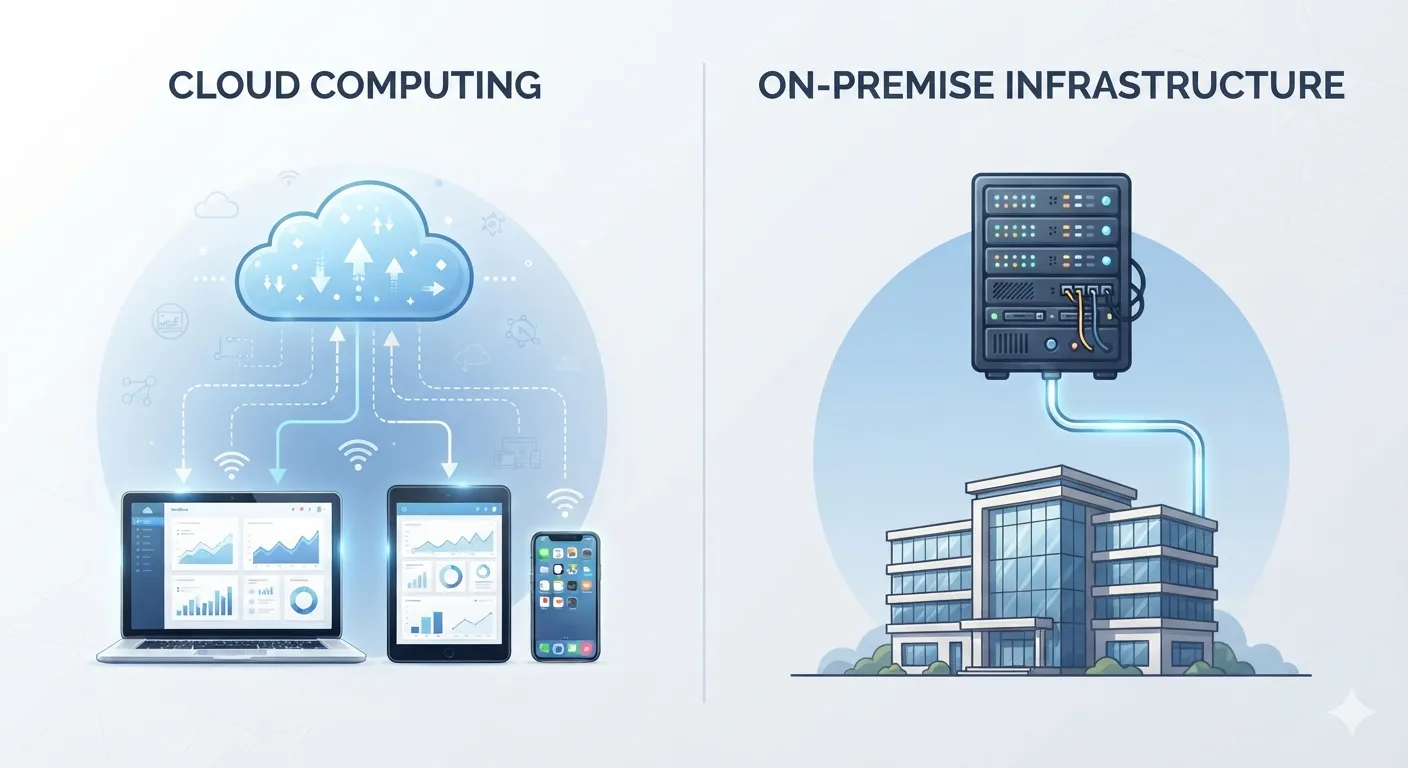
Cloud venue booking software is a system hosted and maintained by the vendor, accessed through a web browser or app rather than installed on local servers. This maps to what NIST defines more broadly as cloud computing: on-demand access to shared, configurable computing resources, commonly delivered as SaaS, PaaS, or IaaS.
In practical terms for a venue team, cloud booking software means:
- Accessible from any device with an internet connection, on-site or remote
- Data stored centrally rather than on a local server
- Updates and security patches handled by the vendor
- Backups and infrastructure managed off-site
- Role-based access so staff only see what’s relevant to them
What Is On-Premises Venue Booking Software?
On-premises venue booking software runs on servers or desktop machines that your organization owns and maintains internally. Rather than logging into a vendor-hosted platform, staff access software installed on your local network.
This model typically means:
- Data lives on servers your organization physically controls
- Your internal IT team handles updates, patches, and maintenance
- Access is often limited to your local network or VPN
- Hardware costs, backups, and disaster recovery are your responsibility
- Customization can go deeper, since you control the underlying environment
Cloud vs. On-Premises vs. Hybrid: At a Glance
| Criteria | Cloud | On-Premises | Hybrid |
|---|---|---|---|
| Best fit | Most venues needing access, speed, and collaboration | Venues with strict internal hosting or control needs | Venues modernizing gradually or keeping legacy integrations |
| Cost model | Subscription (OpEx) | Hardware + license + IT staff (CapEx-heavy) | Mixed |
| Access | Browser/mobile, from anywhere | Often local network or VPN only | Cloud access with select local systems |
| Maintenance | Vendor-managed updates and infrastructure | Internal IT responsibility | Shared |
| Security | Shared responsibility - vendor secures infrastructure, you own data and access | Your organization owns the full stack | Split by workload |
| Scalability | Easier to add users, spaces, or locations | Requires hardware planning and procurement | Depends on architecture |
| Disaster recovery | Vendor-managed; verify RTO/RPO commitments | Fully customer-managed | Mixed |
| Integrations | Generally easier via APIs and connectors | May require custom or local development work | Common during legacy transitions |
How Venue Operations Change in the Cloud
Moving to a cloud venue booking platform changes more than where the data lives, it changes how day-to-day operations run:
- Real-time availability across every space, visible to every authorized staff member simultaneously, without emailing around to check a shared calendar
- Automatic double-booking prevention as new holds and confirmed bookings are checked against the live calendar
- Inquiry routing and follow-up automation, so leads don’t sit in an inbox unanswered
- Proposal, contract, and BEO generation directly from booking data, rather than rebuilding documents manually
- Payment and deposit tracking with automated reminders
- Client portals, letting renters view contracts or pay deposits without a phone call
- Reporting dashboards accessible from anywhere, useful for leadership check-ins without pulling manual reports
- Mobile and on-site access, useful for staff walking a venue during setup or a site visit
For teams evaluating reporting maturity, compare this with dedicated reporting features.
When On-Premises Still Makes Sense
On-premises deployment isn’t obsolete, it’s just a narrower fit today. It tends to make sense when:
- Data sovereignty or internal policy requires it - some institutional, government, or religious organizations have hosting requirements that mandate local control
- Deep legacy customization exists - a highly customized system built around specific internal workflows can be costly to rebuild in a cloud platform
- Internet reliability is a genuine concern - venues in areas with unreliable connectivity may prioritize local access
- A mature internal IT team already manages the infrastructure - some larger institutions have the staff and budget to maintain servers, backups, and security in-house
- Existing hardware investment - an organization that recently invested heavily in on-premises infrastructure may reasonably want to extend its life before migrating
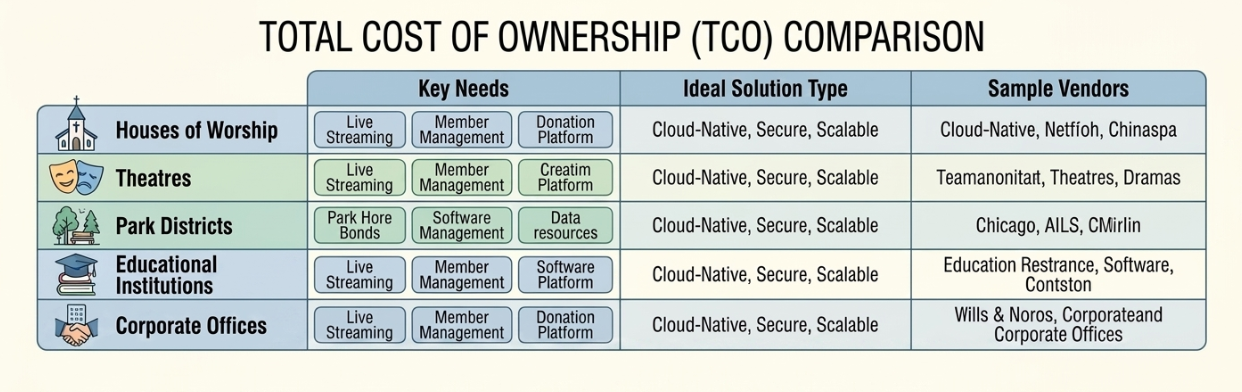
Total Cost of Ownership: What to Include Beyond the License Price
“Cloud is cheaper” and “on-premises is cheaper” are both oversimplifications. A fair comparison requires looking at total cost of ownership, not just the sticker price.
Cloud TCO typically includes:
- Subscription fees (often per-space or per-user)
- Implementation and onboarding costs
- Data migration costs
- Staff training time
- Integration setup
On-premises TCO typically includes:
- Software license fees
- Server hardware and ongoing maintenance
- Internal IT staff time for updates, patching, and troubleshooting
- Backup infrastructure and disaster recovery planning
- Downtime costs when hardware or software issues occur
- Eventual hardware refresh cycles
Venues comparing the two models should build out a real worksheet covering both sets of costs over a three-to-five-year horizon rather than comparing a monthly subscription fee against a one-time license price, the license price is rarely the full picture.
Security, Compliance, and Shared Responsibility
Security concerns are often the biggest hesitation venues have about moving to the cloud, but the framing matters. Microsoft’s shared-responsibility model describes how, as workloads move from on-premises to SaaS, more infrastructure responsibility shifts to the provider, while the customer retains ownership of data, identities, configurations, and access controls.
In other words: moving to the cloud doesn’t mean giving up control of your data. It means the vendor handles more of the underlying infrastructure security, while your organization still owns decisions like who has access, how accounts are configured, and what data policies apply.
For a deeper checklist of platform controls, review security features.
When evaluating a vendor’s security posture, ask about:
- Multi-factor authentication (MFA) for staff accounts
- Role-based access control (RBAC) so permissions match job responsibilities
- Audit logs for booking and contract changes
- Encryption for data in transit and at rest
- Compliance certifications relevant to your organization, depending on your operations, this might include SOC 2, ISO 27001, PCI DSS (for payment processing), GDPR, or others
- Data residency - where your data is physically stored, if that matters to your organization
Disaster Recovery and Business Continuity
Beyond day-to-day security, ask vendors how they handle disaster recovery specifically:
- RTO (Recovery Time Objective) - how long it takes to restore service after an outage
- RPO (Recovery Point Objective) - how much data loss is acceptable in a worst-case scenario, measured in time
- Backup frequency and testing - how often backups run, and whether the vendor actually tests restoring from them
- Failover procedures - whether the platform can shift to a backup system automatically during an outage
A vendor that can answer these questions clearly and has documented, tested procedures is a stronger bet than one that simply says “we do backups.”
Integrations and Data Ownership
Whichever deployment model you choose, confirm two things before signing: how the platform integrates with your existing tools, and what happens to your data if you ever leave.
Integration priorities typically include:
- Ticketing platforms
- Accounting software (QuickBooks, Xero)
- Payment processors (Stripe, PayPal)
- Calendar tools (Outlook, Google Calendar)
- CRM systems, if managed separately
If integration breadth is a major decision factor, compare integrations before selection.
Data ownership questions to ask before signing:
- What format can we export our data in if we switch vendors?
- What’s the data retention policy after we cancel?
- Do we have API access to our own data?
- Are there deletion rights we should be aware of?
These questions matter regardless of deployment model, but they’re especially important with cloud platforms, where your data lives on infrastructure you don’t directly control.
Migration Plan: Moving From Spreadsheets or Legacy Systems to Cloud
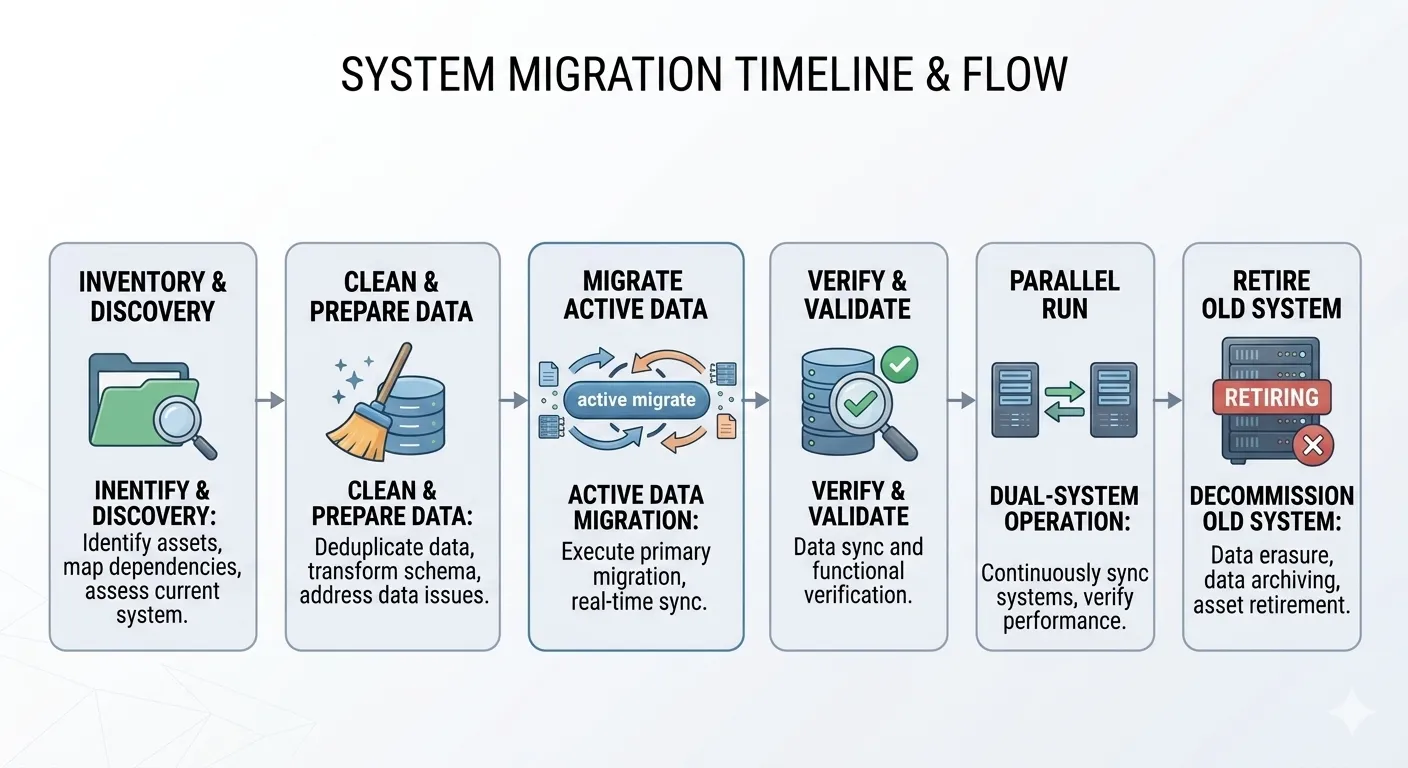
A clean migration typically follows this sequence:
- Inventory existing spreadsheets and systems - get a full picture of where booking data currently lives
- Separate active, recent, and archive data - not everything needs to move at the same priority level
- Clean the data - remove duplicates, standardize formats, fix inconsistent naming
- Rebuild your inventory model - define spaces, capacities, resources, and booking statuses in the new system
- Migrate active bookings first - get anything with an upcoming date into the new system before historical records
- Verify migrated bookings - check active reservations against the source data before relying on the new system
- Run systems in parallel - keep the old system available in read-only mode during a transition window
- Retire the old system once the new one is fully verified and staff are trained
This sequence minimizes the risk of losing an active booking mid-migration, the single biggest fear most venue teams have about switching systems.
Venue-Specific Recommendations
Deployment fit isn’t one-size-fits-all. Here’s how it tends to break down by venue type:
| Venue Type | Typical Fit | Why |
|---|---|---|
| Houses of worship / multi-site churches | Cloud | Multi-campus scheduling, volunteer coordination, and external rental requests benefit from centralized, remote-accessible data |
| Community theatres | Cloud | Season scheduling, contracts, and settlement reporting are easier to manage centrally, especially with part-time or volunteer staff |
| Park districts / recreation centers | Cloud | High volume of public-facing bookings benefits from self-service access and centralized reporting |
| Hotels / restaurants | Cloud, sometimes hybrid | BEOs and F&B coordination often need integration with existing PMS/POS systems |
| Convention centers / arenas | Hybrid, sometimes on-premises | Complex multi-space operations, security requirements, and legacy ticketing integrations may justify a hybrid approach |
| Universities / institutional venues | Depends on IT policy | Some institutions have hosting requirements that favor on-premises or a hybrid model |
Common Challenges and How to Avoid Them
- Underestimating true TCO - comparing a cloud subscription against only the on-premises license price, without factoring in hardware, IT staff time, and downtime costs
- Skipping the security conversation - assuming cloud is automatically less secure, without asking vendors for specifics on MFA, RBAC, and compliance certifications
- Migrating everything at once - attempting to move both active and historical data simultaneously, increasing the risk of errors
- Ignoring data ownership questions - signing a contract without understanding export formats or retention policy after cancellation
- Overlooking integration requirements - discovering a critical accounting or ticketing integration gap after the contract is signed
- Treating deployment choice as purely an IT decision - leaving out operations, finance, and event teams from a decision that affects their daily workflows
Best Practices
- Build a real TCO worksheet covering a three-to-five-year horizon before comparing cloud and on-premises costs
- Ask vendors for documented RTO/RPO commitments, not just a general assurance about backups
- Involve IT, finance, and operations stakeholders in the evaluation, not just whoever manages the current system
- Migrate active bookings first, verify them, and run systems in parallel before retiring the old one
- Clarify data export and deletion rights before signing, regardless of deployment model
- Revisit the deployment decision periodically as your venue’s size, locations, and IT capacity change
Future Trends in Venue Management
- Cloud-first defaults - an increasing share of new venue software is being built cloud-native, with on-premises options becoming a specialized rather than standard offering
- Hybrid architectures for legacy transitions - more vendors are supporting phased migrations that keep specific legacy integrations running during the switch
- Deeper compliance transparency - vendors are increasingly expected to document security certifications and shared-responsibility boundaries clearly, rather than in vague marketing language
- API-first platforms - venues want the flexibility to connect booking data into broader reporting and operational tools, rather than staying siloed
- Predictive utilization and reporting - cloud-native platforms are better positioned to offer real-time, cross-location reporting than legacy on-premises systems
Key Takeaways
- Cloud has become the practical default for most venues; on-premises fits a narrower set of cases (data sovereignty, deep legacy customization, mature internal IT)
- Real cost comparison requires full TCO over 3-5 years, not subscription price vs. license price
- Security is a shared responsibility - cloud vendors secure infrastructure, but venues still own data, access, and governance decisions
- A safe migration prioritizes active bookings first, verifies data, and runs old and new systems in parallel before retiring the legacy system
- Deployment fit varies by venue type - convention centers and arenas are more likely candidates for hybrid than theatres or houses of worship
For most venue operators, the real question isn’t whether cloud is universally better than on-premises, it’s whether a given deployment model reduces booking risk, speeds up response times, protects your data appropriately, integrates with the tools you already rely on, and scales the way your venue actually operates.
For most modern venues, cloud venue booking software has become the practical default: it reduces IT burden, supports remote and multi-location access, and keeps security and infrastructure maintenance in the hands of a vendor built to manage it. On-premises deployment remains a legitimate choice for organizations with specific internal hosting requirements or deep legacy customization, but that’s a narrower case than it used to be.
Conclusion
For most venue operators, the real question isn’t whether cloud is universally better than on-premises, it’s whether a given deployment model reduces booking risk, speeds up response times, protects your data appropriately, integrates with the tools you already rely on, and scales the way your venue actually operates.
For most modern venues, cloud venue booking software has become the practical default: it reduces IT burden, supports remote and multi-location access, and keeps security and infrastructure maintenance in the hands of a vendor built to manage it. On-premises deployment remains a legitimate choice for organizations with specific internal hosting requirements or deep legacy customization, but that’s a narrower case than it used to be.
Not sure which deployment model fits your venue? Talk to VenueArc about a deployment-fit assessment.
Frequently Asked Questions
What is cloud venue booking software?
Cloud venue booking software is a vendor-hosted platform accessed through a browser or app, with centralized data, vendor-managed updates, and infrastructure maintained off-site.
In day-to-day terms, that means staff can reach the calendar from any device with a connection, on-site or remote; data sits centrally rather than on a local server; and security patches, backups, and infrastructure maintenance are the vendor's responsibility rather than yours. Role-based access keeps each user limited to what their job requires.
The practical difference shows up when someone is walking a venue during setup or a manager needs a report from home. With a local install, that access usually requires a VPN or a trip to the office. With a cloud platform, it is simply the normal way the system is used.
What is on-premises venue booking software?
On-premises venue booking software runs on servers your organization owns and maintains internally, with your own IT team responsible for updates, backups, and security.
That ownership cuts both ways. You control the environment, which can allow deeper customization around internal workflows, and your data physically sits on hardware you control. In exchange, hardware costs, patching, backup infrastructure, and disaster recovery planning all become internal work, and access is often limited to the local network or a VPN.
The model still fits organizations with mature in-house IT, strict internal hosting requirements, or a recent hardware investment worth extending. For teams without dedicated IT staff, the ongoing maintenance burden tends to be the deciding factor.
Is cloud venue booking software secure?
It can be, provided the vendor supports strong security practices like MFA, role-based access control, encryption, and relevant compliance certifications. Security responsibility is shared between vendor and customer, not eliminated.
The common assumption is that moving to the cloud means handing over control. In practice it means the vendor takes on more of the underlying infrastructure security while your organization still owns decisions about who has access, how accounts are configured, and what data policies apply. A weak access policy undermines an otherwise well-secured platform.
When evaluating a vendor, ask specifically about multi-factor authentication, audit logs for booking and contract changes, encryption in transit and at rest, and which compliance certifications are relevant to your operations. Which ones actually matter depends on your organization.
Who owns the data in cloud venue booking software?
The venue organization typically owns its data even when hosted by a cloud vendor - the vendor secures the infrastructure, but data ownership and access decisions remain with the customer.
That said, ownership is only as clear as the contract makes it, which is why these questions are worth asking before signing rather than at renewal:
- What format can we export our data in if we switch vendors?
- What is the data retention policy after we cancel?
- Do we have API access to our own records?
- Are there deletion rights we should be aware of?
These matter under any deployment model, but especially with cloud platforms, where the data lives on infrastructure you do not directly control.
Is cloud software cheaper than on-premises software?
It depends on total cost of ownership. Cloud generally has lower upfront costs, while on-premises requires hardware and IT investment, so a full multi-year TCO comparison gives a clearer answer than sticker price alone.
The comparison goes wrong when a monthly subscription is set against a one-time license price. A fair cloud figure includes subscription fees, implementation, data migration, training time, and integration setup. A fair on-premises figure includes the license, server hardware and maintenance, internal IT time for patching and troubleshooting, backup and disaster recovery infrastructure, downtime costs, and eventual hardware refresh cycles.
Building both sides out over a three-to-five-year horizon is what makes the question answerable. Whichever way it lands, the answer is specific to your venue rather than universal.
What is the shared responsibility model?
It's a framework describing how security responsibility is divided between a cloud vendor and its customer - the vendor typically secures the underlying infrastructure, while the customer manages data, access, and configuration decisions.
The dividing line moves depending on the service model. As workloads shift from on-premises toward SaaS, more of the infrastructure layer becomes the provider's responsibility, but identities, configurations, and access controls stay with the customer at every level.
It matters because the gaps that cause problems are often on the customer side: shared logins, permissions that were never tightened after someone changed roles, or MFA that was available but never enabled. Knowing which side of the line a control sits on tells you who has to act on it, which is easier to settle during evaluation than after an incident.
What is RTO and RPO in disaster recovery?
RTO (Recovery Time Objective) is the target time to restore service after an outage. RPO (Recovery Point Objective) is the maximum acceptable data loss, measured in time, in a worst-case failure scenario.
Put plainly, RTO answers how long you would be down and RPO answers how much recent work you would have to recreate. For a venue mid-season, even a short window of lost booking activity can mean re-entering holds, deposits, and confirmations from email and memory.
Both are worth asking about as documented commitments rather than general reassurance, alongside how often backups run and whether the vendor actually tests restoring from them. A vendor that can answer these clearly is a stronger bet than one that simply says it does backups.
When should a venue choose hybrid deployment?
When it wants the accessibility of cloud tools while maintaining specific legacy systems or integrations locally, often during a gradual modernization process.
Hybrid tends to be a transition state rather than a destination. It shows up most often where a legacy ticketing integration, a heavily customized internal workflow, or an institutional hosting requirement cannot move on the same timeline as everything else, so the booking layer goes to the cloud while those pieces stay put.
The trade-off is complexity: security and disaster recovery responsibilities get split by workload, and someone has to own the boundary between the two environments. Convention centers, arenas, and some institutional venues are more likely candidates for hybrid than theatres or houses of worship.
Want technology done right?
Get a free assessment from an Inc. 5000 Microsoft Solutions Partner.
Get Free Assessment ->