venue management
Event Management Software Features: What Matters and What's Just Marketing
A practical guide to the event management software features that actually matter for venue teams, and the ones that are mostly marketing noise.

IN THIS ARTICLE
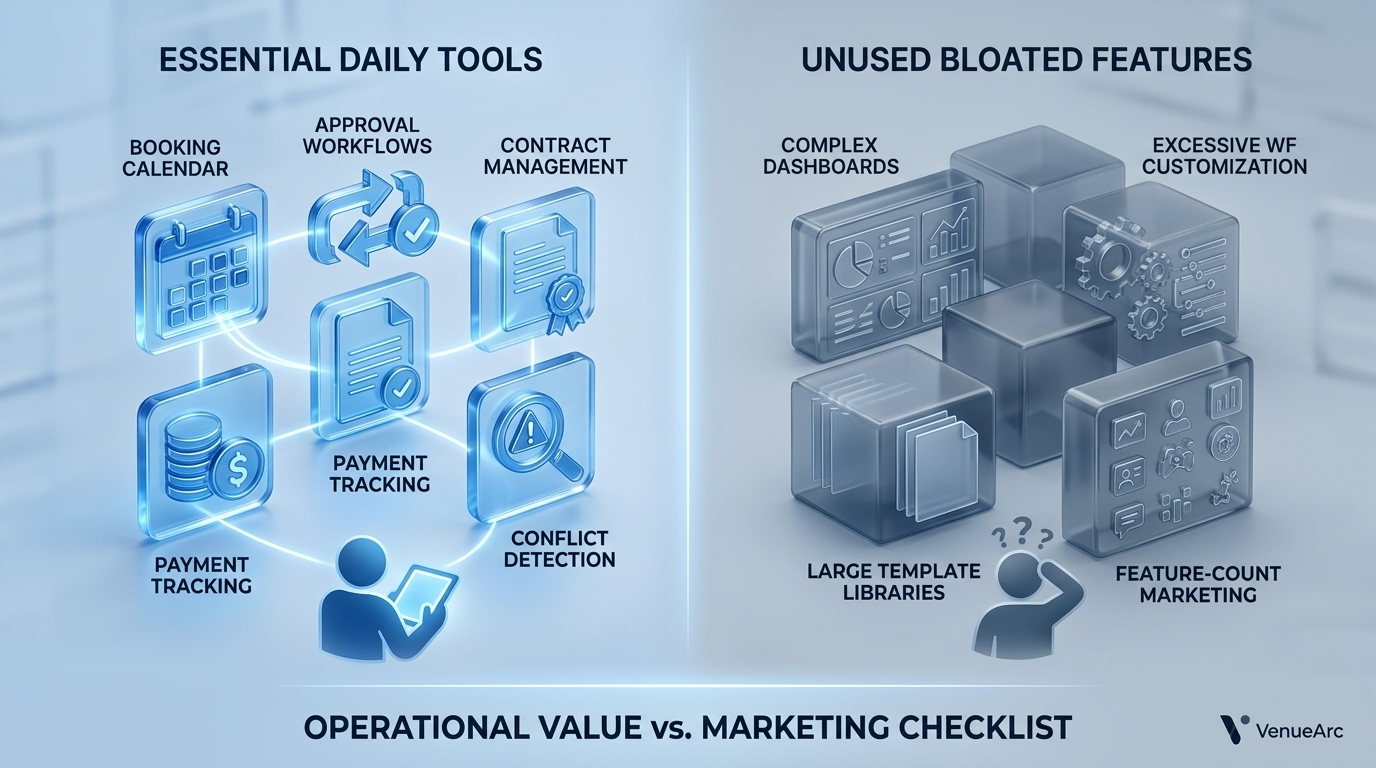
Most event management software feature lists are misleading. The features that determine whether a venue runs smoothly are usually not the flashy capabilities highlighted in product demos. For houses of worship, community theatres, and park districts, the features that matter are the ones that prevent double-bookings, preserve institutional knowledge, manage approvals, and keep contracts, payments, and event information connected in a single system.
If you’re evaluating event management software, the goal is not to buy the platform with the longest feature checklist. The goal is to identify which capabilities your team will use every day, which features become important only at a certain level of complexity, and which features are primarily there to make a sales demonstration look impressive.
What Are Event Management Software Features?
Event management software features are the operational tools that help venue teams manage bookings, approvals, contracts, logistics, payments, reporting, and event execution from inquiry through completion.
The mistake many buyers make is assuming every visible feature carries equal weight. In practice, some capabilities affect every event. Others may only be used a few times per year.
Tier 1: Features You Will Use Every Single Day
These are the features that determine whether staff trust the system.
| Feature | Daily Value | Operational Impact |
|---|---|---|
| Booking Calendar | Very High | Prevents conflicts |
| Availability Checking | Very High | Stops double-bookings |
| Approval Routing | Very High | Creates accountability |
| Event Records | Very High | Centralizes information |
| Contract Tracking | High | Reduces administrative work |
| Payment Tracking | High | Protects revenue |
| Reporting | High | Supports planning |
Booking and Calendar Management
Booking management is the foundation of every venue operation. A booking calendar is not simply a schedule. It is a shared operational record showing what is happening, where it is happening, and what state the booking is currently in.
For example:
A church may have:
- Sunday services
- Wednesday ministries
- Wedding rentals
- Community programs
- Volunteer meetings
All competing for the same physical spaces.
When the calendar becomes disconnected from approvals and contracts, mistakes become inevitable.
Conflict Detection
Conflict detection is one of the most valuable features in modern event management software because it directly attacks one of the most expensive operational failures: double-bookings.
Theatres, churches, and park districts often rely on multiple staff members, volunteers, or department heads. Without automated conflict detection, two people can promise the same space without realizing it.
Approval Workflows
Approval workflows matter far more than many buyers realize.
A facility request often requires review from:
- Facilities staff
- Ministry leadership
- Finance teams
- Venue coordinators
- Recreation supervisors
Approval routing creates a documented process instead of depending on email chains and verbal conversations.
Contract Management
Many event teams still generate contracts manually.
The problem is not document creation. The problem is ensuring the contract remains connected to:
- The booking
- The customer
- The payment schedule
- Event requirements
That connection removes a significant amount of manual administrative work.
Tier 2: Features That Matter Only at a Certain Scale
These features become important once a venue reaches a certain level of operational complexity.
Multi-Site Management
Multi-site management is essential when organizations manage multiple facilities, campuses, theatres, shelters, fields, or community centers.
A church operating a single campus may not need it.
A ministry operating five campuses almost certainly will.
Need help evaluating your workflow?
If your team is comparing booking tools, the most useful next step is a workflow-specific demo based on your actual requests, holds, and approval rules.
Book a DemoRole-Based Permissions
Role-based permissions become critical once volunteer counts grow.
A small venue with two staff members can operate informally.
A theatre with:
- Volunteers
- Box office staff
- Production managers
- Contractors
- Finance personnel
needs clearly defined access levels.
Reporting and Utilization Analysis
Reporting is often underappreciated.
Venue leaders regularly ask questions such as:
- Which spaces are used most often?
- Which spaces generate revenue?
- What months are busiest?
- Which rentals generate repeat business?
Without reporting, those answers become assumptions rather than decisions supported by data.
CRM Capabilities
CRM functionality becomes valuable when relationships become recurring.
A community theatre may rent the same rehearsal space to the same dance school every spring for years.
The relationship matters more than any individual transaction.
Tracking renter history, contacts, previous bookings, and notes becomes far more useful than maintaining isolated event records.
Tier 3: Features That Sound Impressive but Are Rarely Used
This section is often missing from vendor comparison articles.
Not every feature deserves equal attention.
Custom Dashboards Nobody Actually Visits
Custom dashboards frequently appear in demonstrations because they are visually impressive.
The reality is that many venue operators spend most of their time inside:
- Calendar views
- Booking records
- Contracts
- Payment screens
A dashboard viewed once a month should not carry the same weight as a booking calendar used fifty times a day.
Excessive Workflow Customization
Workflow customization sounds attractive until someone has to maintain it.
Most organizations perform best when they standardize common processes.
Excessive configuration can create complexity that survives long after the employee who designed it leaves.
Large Template Libraries
A marketing page may advertise hundreds of templates.
Most venues repeatedly use:
- Booking agreements
- Rental contracts
- Event documentation
- Payment schedules
The number of templates matters far less than whether the templates support daily operations efficiently.
Feature-Count Marketing
One of the weakest buying criteria is feature quantity.
A system with eighty features is not necessarily better than one with twenty.
The better question is:
Which twenty features solve real operational problems?
A Practical Example: Theatre Operations
Consider a community theatre running:
- A rehearsal schedule
- A performance calendar
- Rental events
- Volunteer coordination
The most valuable features are:
- Booking states
- Conflict detection
- Contracts
- Reporting
- Payment tracking
A sophisticated dashboard, advanced visual themes, and dozens of niche configuration screens contribute far less value to daily operations.
This illustrates an important reality:
The features that matter are usually the ones nobody notices when they work correctly.
When Feature-Rich Software Is the Wrong Choice
More functionality is not always better.
A small community venue hosting only a handful of events per month may not need a complex event management platform.
Adding technology introduces:
- Training requirements
- Process changes
- Administrative overhead
Software should match operational complexity.
The best system is not the one with the longest feature list.
The best system is the one your staff and volunteers consistently use.
How to Evaluate Event Management Software Features
Before attending a product demonstration, ask:
- How does the system prevent double-bookings?
- How are approvals handled?
- Can contracts stay connected to bookings?
- How are payments tracked?
- What reporting is available?
- How are permissions managed?
- How difficult is ongoing administration?
If vendors cannot answer those questions clearly, the rest of the feature list may not matter.
Next Decision
If your venue is evaluating software, stop comparing products based on feature quantity. Instead, compare products based on how effectively they handle bookings, approvals, contracts, payments, and reporting.
Start by reviewing event workflow requirements first, then evaluate platforms against those operational needs. A practical next step is reviewing VenueArc’s event management and booking capabilities before scheduling a product demonstration.
Frequently Asked Questions
- What are the most important event management software features?
The most important event management software features are booking management, conflict detection, approval routing, contract management, payment tracking, and reporting. These capabilities affect daily operations and directly reduce scheduling mistakes and administrative work.
- Which event management software features are mostly marketing?
Features that are primarily marketing-driven often include excessive dashboard customization, very large template libraries, and highly specialized configuration options that most venue teams rarely use. Their value depends on actual usage rather than demo appeal.
- How do event management software features prevent double-bookings?
Event management software prevents double-bookings through centralized calendars, real-time availability visibility, booking states, approval workflows, and automatic conflict detection. These capabilities ensure multiple staff members are working from the same information source.
- Which software supports both venue rental management and event space booking?
Venue management platforms designed for community theatres, houses of worship, and park districts typically combine booking management, contracts, reporting, and event operations in one system. Buyers should verify whether booking, contracts, and payment tracking remain connected inside a single record rather than separate tools.
- Do small venues need advanced event management software features?
Not always. A venue operating a single room with minimal bookings may not require advanced workflow capabilities. As scheduling complexity grows, however, operational features become increasingly valuable.
- What reporting features should venue managers look for?
Venue managers should prioritize utilization reporting, revenue reporting, booking trends, demand analysis, and exportable reports for leadership or board review. These reports help guide planning and facility investment decisions.
Ready to simplify your venue operations?
See how VenueArc helps venue teams coordinate bookings, approvals, documents, and settlement without routine operational chaos.