venue management
Event Management Software: The Complete Guide for Venue Managers (2026)
A venue manager's guide to event management software—the full lifecycle from inquiry to settlement, what features matter, and how to evaluate systems.
IN THIS ARTICLE
Event management software is a system that manages the complete lifecycle of an event, from the first inquiry through booking, contracts, payments, execution, settlement, and reporting. For community theatres, houses of worship, park districts, and other community venues, event management software replaces disconnected spreadsheets, calendars, emails, and paper-based processes with a centralized operational system.
For venue managers, the challenge is not putting events on a calendar. The challenge is ensuring every department works from the same information, every approval follows a clear path, every contract remains attached to the booking, and every financial transaction can be reconciled after the event is over.
Event management software connects bookings, contracts, CRM records, payments, documents, and reports into one unified workflow—replacing fragmented systems with a single source of truth for venue operations.
This guide explains how modern event management software works, what features actually matter, where information commonly gets lost during operations, and how to evaluate systems before investing in one.
Key Takeaways
- Event management software manages the entire event lifecycle, not just scheduling.
- Most operational failures occur between systems rather than within them.
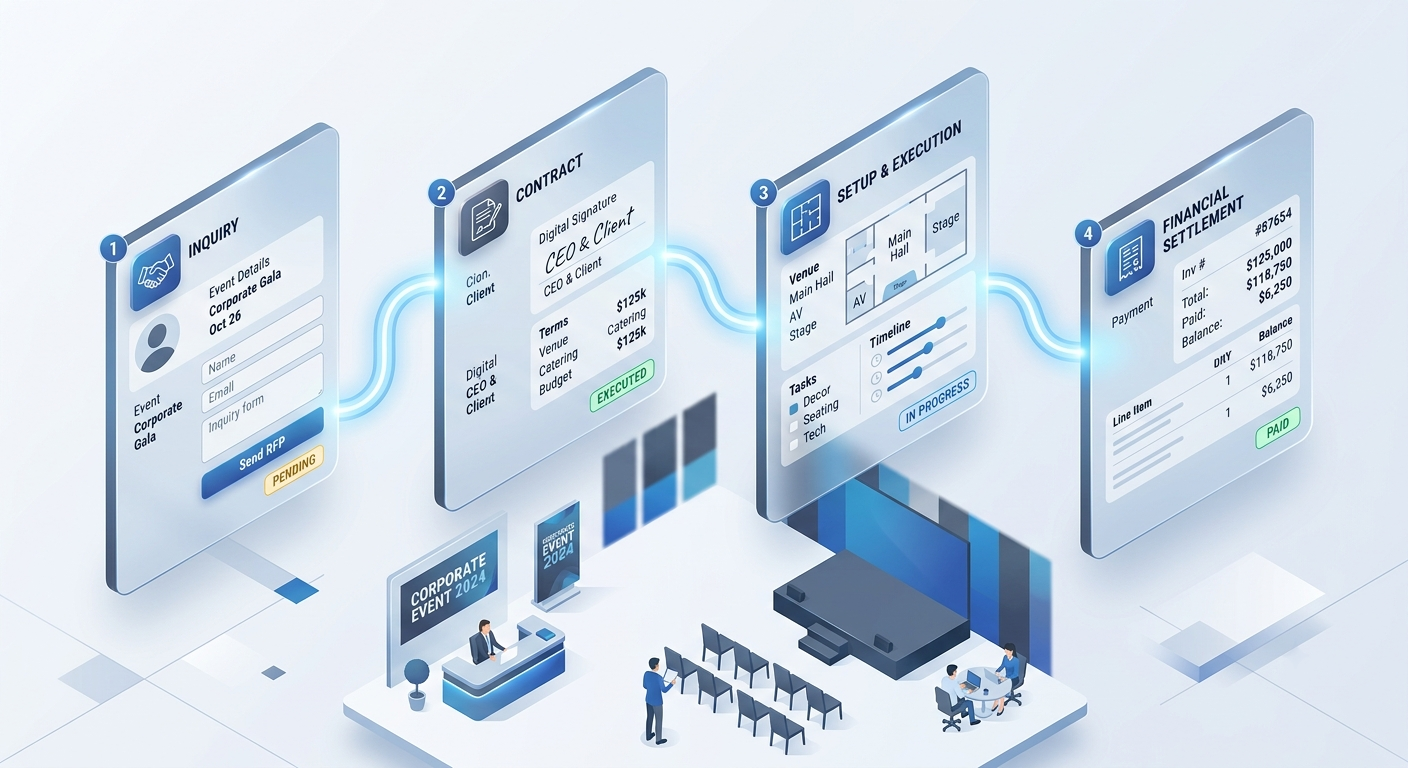
- Event lifecycle management includes inquiry, hold, contract, setup, execution, settlement, and reporting.
- Community theatres, houses of worship, and park districts have unique requirements that generic scheduling tools often cannot support.
- Financial settlement remains one of the most important distinctions between venue-focused software and generic event platforms.
- Cloud-based systems simplify access, maintenance, backups, and security management.
- The best event management systems connect bookings, contracts, CRM records, payments, documents, and reports into one workflow.
What Is Event Management Software?
Event management software is a system that helps organizations plan, schedule, coordinate, execute, and report on events while maintaining a single source of truth for operational and financial information.
Unlike a standard calendar application, event management software follows a booking from the first request through the final closeout process.
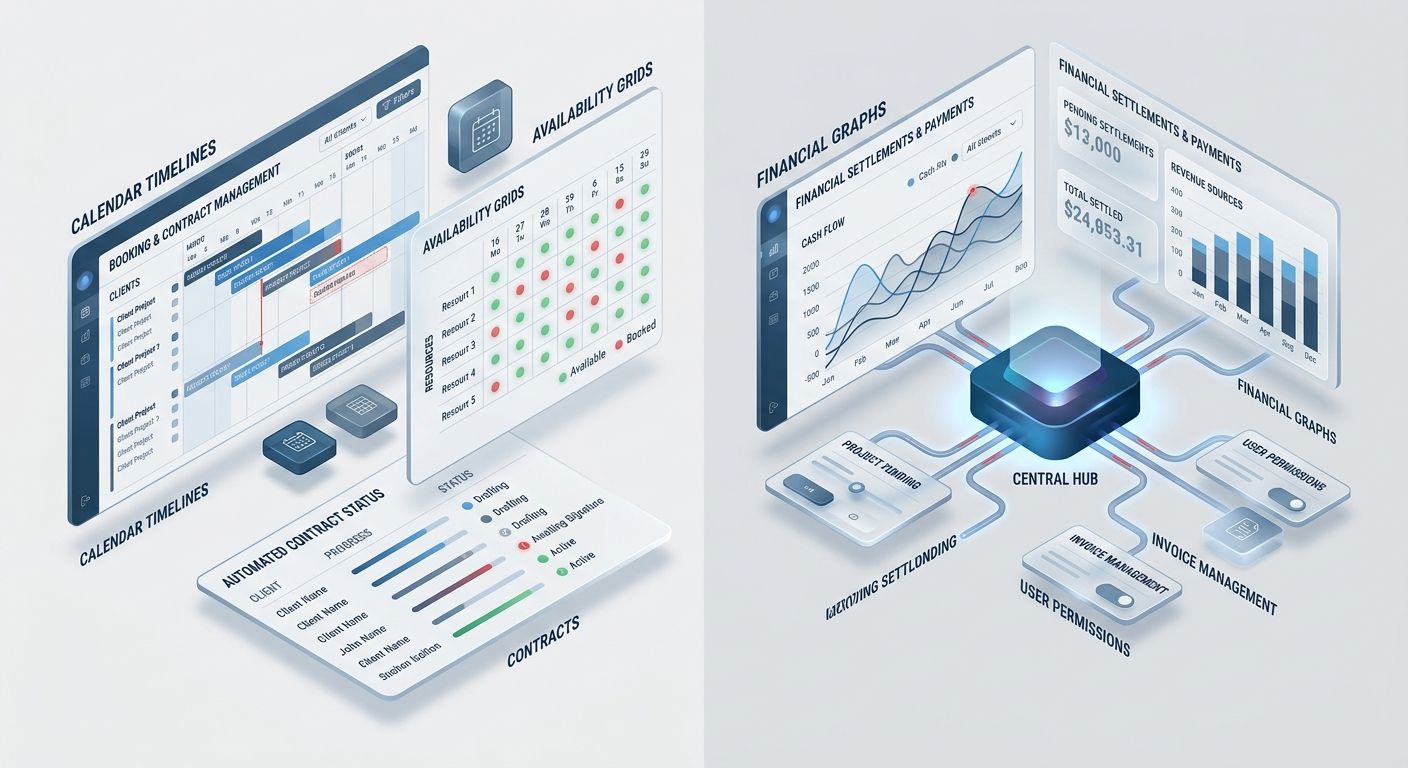
A complete system typically includes:
| Function | Purpose |
|---|---|
| Booking & Scheduling | Manage dates, spaces, availability, and approvals |
| CRM | Store information about clients, renters, organizations, and contacts |
| Contracts | Generate and manage agreements |
| Document Management | Store event files, insurance certificates, and supporting documentation |
| Payment Tracking | Monitor deposits, balances, and payment schedules |
| Reporting | Analyze venue usage and revenue |
| Settlement | Reconcile financial outcomes after events |
For venue managers, these components matter because an event is rarely a single action. It is a chain of operational decisions that must stay connected.
Why Event Management Becomes Difficult as Organizations Grow
Small venues often begin with manual systems.
A church may use Outlook and spreadsheets. A community theatre may maintain separate production calendars and rental schedules. A park district may manage reservations through email and printed forms.
The problem is not that these tools stop working overnight. The problem is that organizational complexity grows faster than the systems supporting it.
A request is submitted. Someone checks availability. Another person approves it. A contract is generated. A deposit must be collected. Facilities staff need setup instructions. The event occurs. Accounting reconciles revenue afterward.
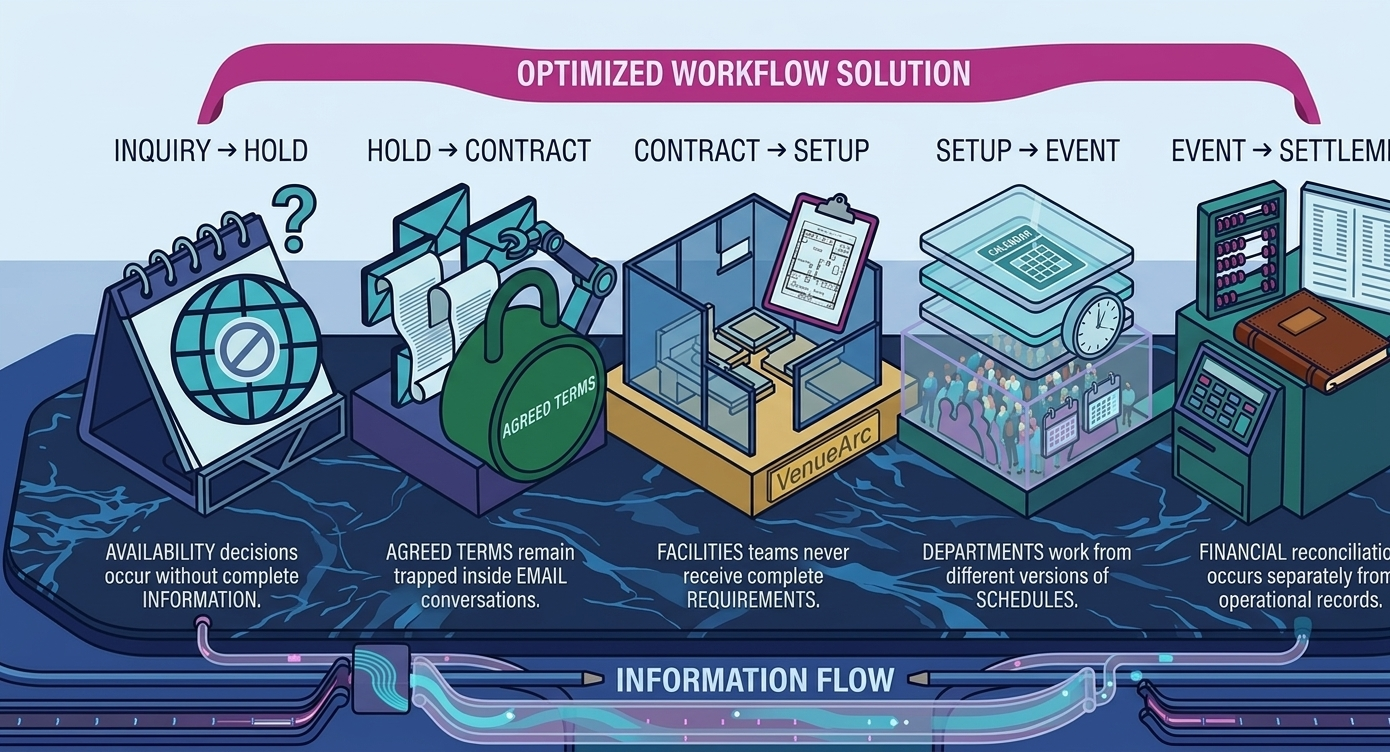
Each manual handoff creates risk. The most common operational failures include:
- Double bookings
- Disconnected systems
- Manual bottlenecks
- Communication gaps
- Lack of visibility
The calendar itself is rarely the issue. The issue is that availability exists in one system, contracts in another, payments somewhere else, and setup requirements in individual inboxes.
Understanding the Complete Event Lifecycle
The easiest way to understand event management software is to follow a single booking through its entire lifecycle.
Inquiry
Every event begins with a request. A theatre company requests a performance date. A ministry requests use of a fellowship hall. A community organization requests a shelter reservation.
At this stage, details are often incomplete and subject to change. The primary goal of the inquiry stage is collecting enough information to determine feasibility.
Hold
A hold reserves space while details are finalized. This is particularly important in theatre operations. A hold is not a booking. A hold protects availability while conversations continue.
Organizations that skip formal hold management often discover booking conflicts later.
Contract
Once approved, the booking moves to contract generation. At this stage, organizations may require:
- Rental agreements
- Deposit schedules
- Cancellation policies
- Insurance requirements
- Usage terms
- Approval records
The contract transforms an intention into an operational commitment.
Setup and Planning
This phase focuses on execution requirements. Examples include:
- Room configurations
- Staffing assignments
- Volunteer coordination
- Access permissions
- Security arrangements
- Setup and teardown requirements
This stage frequently causes operational failures when information is scattered across multiple systems.
Event Execution
The event takes place. During execution, staff require visibility into schedules, responsibilities, documents, and operational requirements. Successful execution depends on the quality of information captured earlier.
Settlement
Settlement is among the most overlooked phases of event management. Settlement occurs after the event and involves financial reconciliation.
Examples include:
- Final payments
- Revenue calculations
- Expense tracking
- Deposit reconciliation
- Event profitability reporting
Many generic tools end at scheduling. Venue-oriented systems continue through settlement.
Event Management Software vs Generic Scheduling Tools
Not every scheduling tool qualifies as event management software. The differences become clear when comparing operational requirements.
| Tool Type | Strengths | Limitations |
|---|---|---|
| Shared Calendar | Tracks availability | No workflow, contracts, reporting, or payments |
| CRM | Manages relationships | Does not manage venue operations |
| Project Management Software | Coordinates tasks | Does not understand bookings or facility availability |
| Ticketing Platform | Manages ticket sales | Does not manage facilities and venue operations |
| Event Management Software | Manages complete event lifecycle | Requires clear organizational processes |
The distinction becomes important once approvals, contracts, staffing, and reporting enter the equation.
Need help evaluating your workflow?
If your team is comparing booking tools, the most useful next step is a workflow-specific demo based on your actual requests, holds, and approval rules.
Book a DemoCore Features Every Venue Manager Should Evaluate
Not every feature carries equal operational value. Some capabilities affect daily workflows. Others are rarely used.
Booking and Scheduling
Scheduling remains the operational foundation. Key capabilities include:
- Real-time availability
- Conflict detection
- Approval workflows
- Multiple facilities
- Recurring bookings
- Booking status management
Without these features, operational complexity grows rapidly.
Customer Relationship Management (CRM)
Venue relationships are often long-term. The same organization may rent a facility repeatedly over many years. A venue-focused CRM maintains:
- Organization history
- Contact records
- Booking history
- Payment history
- Historical notes
This creates continuity between events.
Contract Management
Contracts should remain connected to booking data. Manual re-entry creates unnecessary errors. Effective contract management includes:
- Templates
- Approval history
- Document storage
- Signature tracking
Payment Tracking
Revenue management extends beyond invoicing. Systems should support:
- Deposits
- Balance tracking
- Payment schedules
- Outstanding balances
Visibility into payments reduces administrative effort and improves accountability.
Document Management
Venues often maintain large volumes of event-related documents. Examples include:
- Contracts
- Insurance certificates
- Event notes
- Supporting documents
Centralized document storage reduces retrieval problems later.
Reporting
Reporting provides visibility into operations. Common reporting areas include:
- Venue utilization
- Revenue trends
- Booking volume
- Space demand
- Event categories
Leadership teams often rely on reporting to guide operational decisions.
Where Information Gets Lost During Operations
Software adoption frequently begins because organizations discover recurring points of failure. The most common information-loss points include:
Staffing, Volunteers, and Resource Assignment
Venue operations rarely involve a single person. Even modest organizations often coordinate:
- Facilities staff
- Volunteers
- Administrators
- Technical staff
- Finance teams
- External renters
Event management systems help align responsibilities. Examples include:
- Task assignments
- Volunteer coordination
- Operational visibility
- Access controls
- Role-specific permissions
This becomes especially important in organizations with frequent volunteer turnover.
Cloud-Based Event Management Software vs On-Premise Systems
Cloud-based event management software operates through the internet and is maintained by the vendor. On-premise systems are maintained internally.
For most community venues, cloud deployment simplifies:
- Software updates
- Backup management
- Remote access
- Disaster recovery
- Infrastructure maintenance
Cloud systems also make it easier for staff, volunteers, and administrators to access information across locations. Organizations already using Microsoft environments may also benefit from identity-management integration strategies and centralized access governance.
What Does SaaS Actually Change?
Many software vendors describe themselves as SaaS. The term often receives more attention than it deserves.
The real operational advantages include:
- Automatic updates
- Reduced infrastructure responsibilities
- Faster deployment
- Lower maintenance burden
- Improved accessibility
SaaS does not automatically fix poor processes. An undefined approval workflow remains undefined regardless of deployment model. Software improves operations only after organizations establish clear policies and responsibilities.
When Event Management Software Is the Wrong Choice
Not every venue requires dedicated event management software. Organizations may not benefit if:
- They manage only one or two bookings each month.
- They have a single room with minimal scheduling complexity.
- They do not require contracts or approvals.
- Reporting is not important.
In these situations, simple tools may be sufficient. The value of event management software grows with operational complexity. Multiple spaces, recurring bookings, contracts, payments, volunteers, and reporting requirements usually justify a more structured approach.
Example Scenario: Managing a Community Venue
Consider a church that operates:
- Sanctuary
- Fellowship hall
- Classroom wing
- Gymnasium
The organization receives:
- Weekly ministry requests
- Community rental requests
- Wedding reservations
- Seasonal events
Without a centralized system, multiple people may coordinate schedules independently. Availability discussions occur through email. Contracts are stored separately. Payment records live elsewhere. The result is uncertainty.
With a unified event management system, bookings, contracts, payments, approvals, documents, and reporting remain connected throughout the lifecycle of each event.
How to Evaluate Event Management Software
Before requesting a demonstration, answer the following questions.
| Category | Questions |
|---|---|
| Operational Questions |
|
| Financial Questions |
|
| Technical Questions |
|
Frequently Asked Questions
- What is event management software?
Event management software is a centralized system for organizing the full lifecycle of an event, including inquiries, holds, approvals, contracts, payments, staffing, execution, and settlement.
- Why does venue software matter so much?
It replaces fragmented spreadsheets, emails, and manual handoffs with a single operational record that keeps event details, approvals, documents, and financial tracking aligned.
- What should venue leaders look for?
Look for real-time availability, contract tracking, payment visibility, document management, reporting, and a workflow that matches your operations rather than forcing you into a generic scheduling tool.
- Is cloud-based software better for community venues?
For most organizations, yes. Cloud software reduces infrastructure complexity, improves access, and makes it easier for staff, volunteers, and administrators to work from one shared source of truth.
Ready to simplify your venue operations?
See how VenueArc helps venue teams coordinate bookings, approvals, documents, and settlement without routine operational chaos.