venue management
Venue Booking Software: How to Choose the Right Platform
Compare venue booking software by five criteria: self-service, booking states, contracts, permissions, and pricing. Use this buyer's guide before choosing.
IN THIS ARTICLE
The right venue booking software should do more than show which rooms are occupied. It should reflect how your organization actually accepts requests, approves bookings, manages contracts and payments, controls staff access, and grows across facilities. For houses of worship, community theatres, and park districts, those details matter because a booking is rarely just a date on a calendar.
This guide gives you five criteria to use when evaluating a venue booking platform. By the end, you should be able to separate a simple online calendar from a system that can actually support your booking operation, ask better questions during vendor demos, and identify which tradeoffs matter for your organization.
Key takeaways
- The best venue booking software matches your real booking workflow rather than forcing every request into a simple busy/free calendar.
- External self-service can reduce administrative work, but only when your organization is comfortable defining what can be booked automatically and what requires approval.
- Contracts, deposits, payments, and booking information should stay connected instead of being managed across separate spreadsheets and email threads.
- Permission design matters when volunteers, part-time staff, ministries, renters, and finance teams all need different levels of access.
- Pricing should be evaluated against your organization’s structure. Per-seat pricing and per-facility pricing create very different outcomes as your team and number of locations grow.
What is venue booking software?
Venue booking software is a system that manages reservations for physical spaces while connecting booking activity to the operational work that follows, such as approvals, contracts, payments, documents, and reporting.
A basic calendar answers one question: Is the space occupied? A venue booking system should answer a much larger set of questions: Who requested the space? What is the booking status? Who approved it? What contract applies? Has the deposit been received? Which staff members can see or change the booking?
That distinction becomes important once an organization manages more than one bookable space, accepts outside rentals, or requires approval before a reservation becomes confirmed.
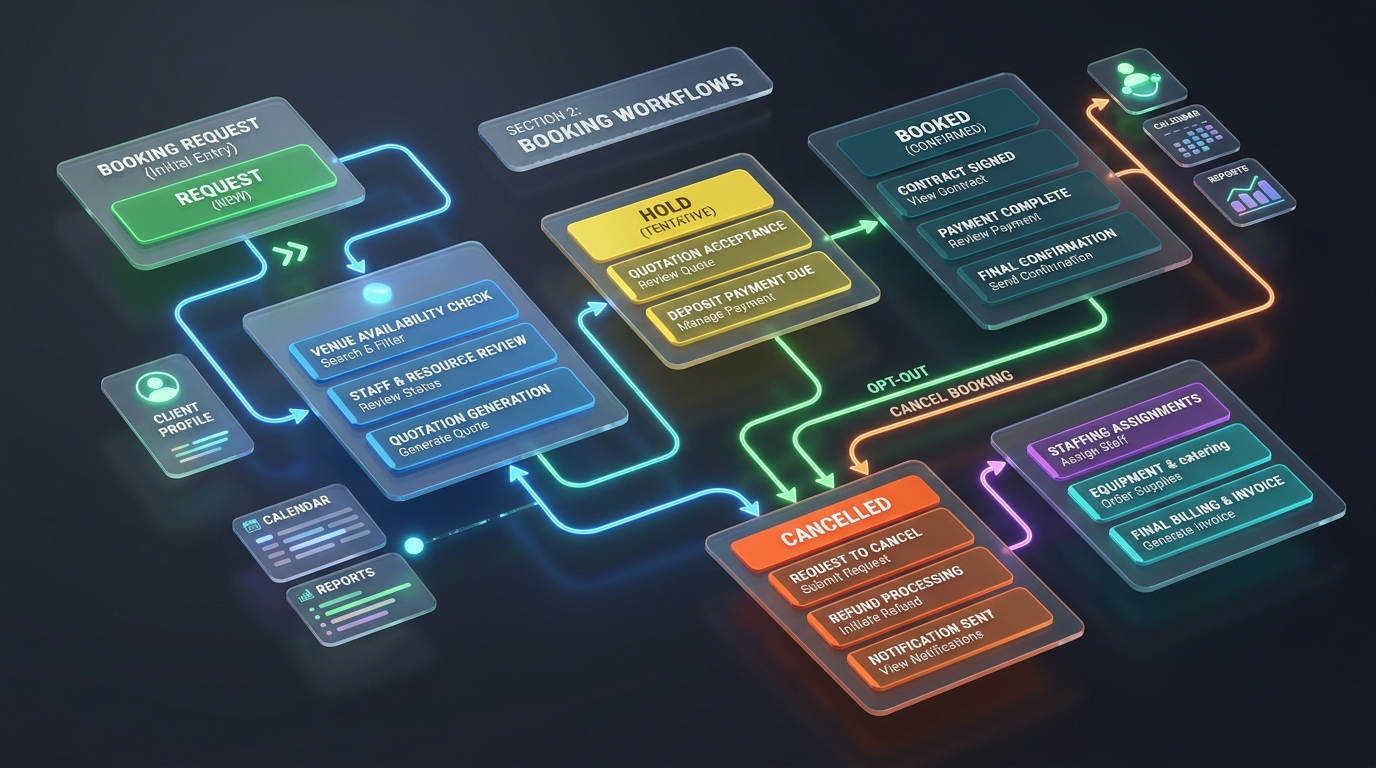
VenueArc is designed around this model for houses of worship, community theatres and park districts. Its booking workflow includes a shared calendar, conflict detection, booking states such as Request, Hold, Booked, Budgeted and Cancel, approval routing, and confirmations. The wider platform connects booking with contracts, payment tracking, documents and reporting.
For the broader operational context, see the facility scheduling and reservation guide.
1. Can external clients self-serve, and should they?
The first question to ask is not simply whether a platform offers online booking. Ask how much of your booking process should happen without staff intervention.
For some organizations, self-service is useful for straightforward reservations. A park district may want residents to submit a shelter request without emailing a recreation supervisor. A community theatre may allow a renter to submit an inquiry for a rehearsal room. A house of worship may want outside groups to request a weekday room while keeping Sunday morning bookings subject to internal approval.
The important distinction is between requesting a space and automatically confirming a booking.
Your venue may need to check:
- Whether the space is appropriate for the requested activity
- Whether staff or volunteers are available
- Whether an insurance certificate is required
- Whether a deposit or contract is required
- Whether the booking conflicts with a recurring internal event
- Whether a resident, member, nonprofit or commercial pricing rule applies
- Whether a particular person has authority to approve the request
A platform that blindly confirms every available time slot can create a new problem: automation without governance.
What to test during a demo
Ask the vendor to show exactly what happens when an external renter submits a request.
| Requirement | What you should see in the demo |
|---|---|
| External request | A renter can submit booking information without your staff manually re-entering every detail |
| Approval | A request can be routed to the appropriate person before becoming confirmed |
| Conflict handling | The system detects conflicts before a second booking is committed |
| Booking status | Staff can distinguish a request, hold, confirmed booking and cancellation |
| Confirmation | The customer receives a clear confirmation once the booking is approved |
| Exceptions | Staff can handle unusual cases without breaking the underlying calendar |
VenueArc’s current booking feature includes Request status, approval routing, conflict detection and confirmations. The exact level of unaided public self-service available for a particular venue workflow should be confirmed during a product demonstration rather than assumed from the existence of an online booking process.
2. Does the platform understand your booking states, not just busy versus free?
The second criterion is whether the system understands the difference between a space being unavailable and a booking being final.
A calendar that only knows “busy” and “free” is often too simple for venue operations. A community theatre may place a performance on hold while details are negotiated. A park district may receive a reservation request before a permit is approved. A church may have a recurring ministry booking that occupies the calendar but is not available for external rental.
These are different states, and treating them as one can create confusion.
A useful venue booking system should make the status of a booking visible and operationally meaningful.
VenueArc’s booking workflow includes states such as Booked, Hold, Budgeted, Cancel and Request, allowing the calendar to reflect more than simple availability.
Why holds matter
Consider a theatre preparing its next season.
A Saturday evening might be held for a potential rental while the organization waits for a signed contract. If another staff member sees that date as simply “available,” they may promise it to somebody else. If the date appears exactly the same as a confirmed booking, staff may misunderstand how firm the commitment actually is.
The software should preserve the distinction.
This is especially important when you have:
- Recurring bookings
- Performance holds
- Internal events
- External rentals
- Approval stages
- Cancellations
- Multiple rooms involved in one event
The question to ask a vendor is simple:
“Show me your booking states, then show me what each state allows staff to do.”
Do not settle for a generic calendar demonstration.
3. Do contracts and payments live with the booking?
The third criterion is whether the financial and contractual record stays connected to the reservation.
A venue rental often begins as a request and ends with much more than a calendar entry. There may be a facility-rental agreement, deposit schedule, insurance documentation, cancellation terms, outstanding balances and final settlement information.
If those pieces live in separate systems, staff have to reconstruct the history manually.
That is where familiar problems appear:
Calendar says one thing.
Email says another.
Spreadsheet says a third.
Venue booking software should give your team a single record from which the operational history can be understood.
VenueArc connects booking with dedicated functionality for facility-rental contracts and payment tracking. The platform also includes a Document Center for event documents, insurance certificates and riders.
What to ask
Before buying, ask the vendor to demonstrate a booking from start to finish:
- A client submits a request.
- Staff approve the booking.
- A contract is generated.
- Fees and deposit requirements are recorded.
- The booking becomes confirmed.
- A payment is received.
- The remaining balance is visible.
- The team can find the related documents without searching through email.
If the demonstration stops after step two, you are looking at booking software, but you may not be looking at a complete venue workflow.
A concrete example
Imagine a park district receives a request to rent a community center for a Saturday family event.
The booking is not complete simply because the room is open. The organization may need an agreement, payment schedule, insurance documentation and approval.
A suitable booking system keeps that information connected to the reservation rather than creating a separate administrative trail for every stage.
4. How does the permission model handle volunteers and part-time staff?
The fourth criterion is easy to underestimate until the wrong person edits the wrong record.
Venue organizations rarely have a workforce composed entirely of full-time administrators. A church may have paid staff plus ministry leaders and volunteers. A community theatre may rely on seasonal workers and event staff. A park district may have employees with responsibilities divided by facility or function.
Those people should not necessarily have identical access.
A booking coordinator may need to create and edit reservations. A volunteer may need to view the calendar. Finance staff may need access to payment information. Leadership may need reporting without changing operational bookings.
A venue booking platform should let you define access around those responsibilities.
What to test
Ask the vendor to create at least three different user roles during the demo:
| User | Should typically need | Should not automatically need |
|---|---|---|
| Booking coordinator | Create, edit and approve bookings | Full financial administration |
| Volunteer or event staff | Relevant schedule and event details | Sensitive financial records |
| Finance staff | Payment and contract information | Unrestricted calendar administration |
The underlying principle is least-privilege access: users should receive the permissions necessary for their role rather than broad access simply because it is easier to configure. Microsoft Entra’s identity and access documentation describes role-based access control as a way to assign permissions according to defined roles and scopes. Microsoft Learn: Microsoft Entra RBAC.
This becomes even more important when staff turnover is high. If five volunteers share one calendar login, you lose a clean record of who made changes and create unnecessary access problems when someone leaves.
VenueArc’s security model includes role-based access control and is hosted on Microsoft Azure. Organizations already using Microsoft identity infrastructure should also ask how the platform’s access process fits into their existing joiner-leaver workflow. Verify the exact sign-in and identity configuration during implementation.
5. What does the pricing model do to you as you grow?
The fifth criterion is the one most buyers inspect too late.
Do not evaluate a venue booking platform only by asking, “How much does this cost?” Ask:
“What is the pricing unit?”
Common pricing models can charge by:
- User
- Seat
- Event
- Transaction
- Facility
- A combination of these
The choice changes the economics of the system.
A volunteer-heavy organization can feel the effects of per-user licensing much more sharply than an organization with a small administrative team. If every person who touches the calendar requires a paid seat, organizations may start sharing accounts or limiting access to control costs. Both create operational problems.
VenueArc uses per-facility pricing rather than per-user or per-event pricing. For this model, a facility means a physical location. A church with a sanctuary, fellowship hall, classrooms and gym at one location is treated as one facility, while a separate satellite campus is a second facility.
That distinction matters when you evaluate growth.
Compare pricing models this way
| Question | Per-user model | Per-event model | Per-facility model |
|---|---|---|---|
| Adding volunteers | Can increase cost | Usually no direct effect | Usually no direct effect |
| High booking volume | Usually no event charge | Cost can rise with volume | Usually no direct event charge |
| Multiple locations | Depends on users | Depends on events | Cost scales with facilities |
| Shared access temptation | Higher when seats are limited | Depends on user rules | Lower pressure to ration accounts |
| Best comparison question | ”How many users?" | "How many bookings?" | "How many facilities?” |
The goal is not to declare one model universally better. It is to identify the model that fits the way your organization actually operates.
A five-campus organization should model its facility count. A theatre with a small administrative team but many volunteers should model how many people need properly permissioned access. A park district should model how facilities may be added over time.
Do not buy based on today’s spreadsheet. Price the operational shape you expect to have after implementation.
Need help evaluating your workflow?
If your team is comparing booking tools, the most useful next step is a workflow-specific demo based on your actual requests, holds, and approval rules.
Book a DemoWhat should you bring to a venue booking software demo?
A good demo should be built around your workflow, not the vendor’s prepared tour.
Before the meeting, write down your actual booking process from inquiry to confirmation.
Then take this checklist into the demo:
Booking requirements
- How many physical facilities do we manage?
- How many bookable spaces exist within each facility?
- Which bookings are internal?
- Which bookings are external rentals?
- Which bookings require approval?
- Which spaces have recurring reservations?
- Which bookings require deposits or contracts?
- Which users need calendar access?
- Which users should see financial information?
Workflow requirements
- Can the system distinguish requests, holds and confirmed bookings?
- Can recurring reservations be handled without losing individual exceptions?
- Can conflicts be detected automatically?
- Can different people approve different types of bookings?
- Can booking records carry contracts and documents?
- Can the team track payments and outstanding balances?
- Can reporting show utilization and revenue trends?
Vendor questions
Ask these even when they are uncomfortable:
Can we export our data if we leave?
You should understand the available export formats, what information is included, and whether historical records remain usable.
What is the contract term?
Do not assume a monthly-looking price means a month-to-month commercial agreement.
What happens to our data when the agreement ends?
Ask about retention, export windows, deletion, and the practical process for transitioning away.
Who handles implementation?
Find out whether the vendor simply gives you login credentials or actively helps configure facilities, booking rules, permissions and workflows.
Who decides how our approval process should work?
Software cannot resolve an organizational decision that has never been made. Decide who can approve bookings before expecting automation to fix the process.
What happens when a recurring booking has a one-off exception?
This is where generic calendar software often becomes uncomfortable. Ask the vendor to demonstrate a real exception rather than describing the feature.
A practical comparison: what are you actually buying?
The difference between tools becomes clearer when you compare the underlying operating model.
| Capability | Shared spreadsheet + calendar | Basic booking tool | Purpose-built venue booking software |
|---|---|---|---|
| Multiple bookable spaces | Manual coordination | Usually supported | Core workflow |
| Conflict detection | Depends on staff | Usually supported | Core workflow with booking states |
| Requests and approvals | Email/manual | Varies | Built into booking workflow |
| Holds vs confirmed bookings | Often unclear | Varies | Explicit booking states |
| Contracts | Separate files | Often separate | Can be connected to booking |
| Payment tracking | Separate spreadsheet/system | Varies | Connected operational workflow |
| Staff permissions | Often broad/shared | Varies | Role-based access |
| Event documents | Folders/email | Varies | Centralized with event records |
| Utilization reporting | Manual | Limited | Operational reporting |
| Multi-facility operations | Difficult to reconcile | Depends on product | Designed around facilities |
The table also exposes an important truth: you may not need venue booking software at all.
A single community room with a handful of bookings each year does not justify the same system as a community theatre managing performances, rehearsal spaces and outside rentals. An arena with a very different operational model may need a different class of platform. An organization that requires native ticketing should verify whether the product offers the required capability directly or through a named integration.
Good software selection is partly about knowing when not to buy.
Where does VenueArc fit?
VenueArc is designed for organizations that have moved beyond “put it on the calendar” but do not want to build an internal software operation.
The platform combines venue booking with the operational workflow around it: booking states and conflict detection, approval routing, event management, contracts, CRM records, documents, payment tracking and reporting.
Its strongest fit is organizations where shared physical spaces are central to the operation:
- Houses of worship: coordinate ministry use, outside rentals, volunteers and recurring services across one or more facilities.
- Community theatres: manage holds, rentals, contracts, event operations and settlement-related information around performance activity.
- Park districts: manage facilities and community rentals while maintaining clear approval, pricing and reporting workflows.
VenueArc is built and operated by Al Rafay Consulting and runs on Microsoft Azure. Its booking functionality is the right place to start when evaluating the calendar and reservation workflow. For organizations concerned with access controls and cloud infrastructure, the security feature page provides the product-level context.
Full disclosure: VenueArc is the platform being built by Al Rafay Consulting. Evaluate the same five criteria above against VenueArc that you would apply to any other vendor.
Which venue booking software should you choose?
Choose the platform that fits the way your organization actually makes decisions about space.
That means testing five things in order:
- External booking: Can renters submit requests efficiently, and which reservations should remain subject to staff approval?
- Booking states: Can your calendar represent holds, requests, confirmations and cancellations rather than only busy/free?
- Contracts and payments: Does the booking remain connected to the financial and document workflow?
- Permissions: Can volunteers, part-time staff, finance teams and administrators access what they need without sharing accounts?
- Pricing model: Does the pricing structure fit your facility count, booking volume and staffing model?
The best demo is not the one with the most features. It is the one where a vendor can take your messiest real booking and show exactly what happens from request to confirmation.
Frequently Asked Questions
- What is venue booking software?
Venue booking software is a system that manages reservations for physical spaces while connecting booking activity to approvals, contracts, payments, documents, and reporting.
- Should external clients self-serve?
Sometimes, but not always. The right answer depends on your venue's policy, risk profile, approval flow, and whether the space requires staff review before a reservation becomes confirmed.
- Why do booking states matter?
A system that only knows busy versus free often cannot distinguish a request, a hold, a confirmed booking, a canceled event, or a recurring internal use. Those differences matter operationally.
- How should I evaluate pricing?
Look at the pricing unit, not just the headline cost. Per-user, per-event, and per-facility models create very different cost outcomes as staff, locations, and booking volume grow.
Ready to simplify your venue operations?
See how VenueArc helps venue teams coordinate bookings, approvals, documents, and settlement without routine operational chaos.